Data Privacy & Security
All personal data and documents on the platform are encrypted to ensure maximum security.
- Companies
- 200+
- Hours tracked
- 50M+
- Holidays taken
- 50,000+





Clarity and security
Each role has precise permissions: by default, employees see their own data, and whoever manages roles decides what each custom role can see.
Dedicated subdomain
When you create an account, our platform assigns a dedicated subdomain for you which ensures data isolation & protection.
- Your company's data lives in its own isolated environment, completely separate from other organizations on the platform.
- The dedicated subdomain means there's no shared infrastructure that could expose your data to other accounts.
- This setup makes it easier to manage access, apply security policies, and maintain a clear boundary around your company's information.
- Your subdomain is assigned automatically at account creation, no technical setup required on your end.
Document confidentiality
Company documents are visible to the roles that manage documents, which by default are Admin, Manager, and HR. By default, an employee or collaborator sees their own documents, and a custom role can be granted document access.
- Employee documents such as contracts and policies are visible by default to Admin, Manager, and HR, the built-in roles that hold the document permission.
- Employees can upload, view, and edit their own documents, and deleting a document needs the document permission.
- Collaborators and contractors follow the same role rules, so by default they see their own documents.
- Whoever manages roles decides whether a custom role gets the document permission.
Private evaluations
Evaluations are visible to the roles that manage evaluations, which by default are Admin and Manager. A role granted the permission for subordinates sees the evaluations of the people below it in the reporting line. By default, an employee or collaborator sees their own evaluations.
- Performance reviews and salary evaluations, including compensation and role changes, are visible by default to the employee they belong to and to Admin and Manager.
- Employees can track their own evaluation history and outcomes.
- Admin and Manager see evaluations across the team, which helps with running review cycles. HR does not hold the evaluations permission by default, and a custom role can be granted it.
- Evaluation access follows each user's role, and whoever manages roles decides what a custom role can see.
Limited visibility of employee data
Full employee profiles are visible to the roles that manage employees, which by default are Admin, Manager, and HR. Salary fields need a separate salary permission. By default, an employee sees their own profile and a shorter profile of each colleague.
- Salary fields are hidden from every built-in role except Admin, and a custom role sees them once it is granted the salary permission.
- By default, an employee sees colleague profile fields such as name, work email, phone number, birth date, photo, position, department, and start date. A colleague's personal email and home address stay with the roles that manage employees.
- Invoices need the invoice permission, which Admin holds by default. Admin and Manager manage all projects, HR can view all of them, and an employee sees the projects they are assigned to. A custom role can be granted either permission.
- Role-based visibility is enforced at the system level, so there's no manual configuration needed to protect sensitive data as your team grows.
Secure and stable application
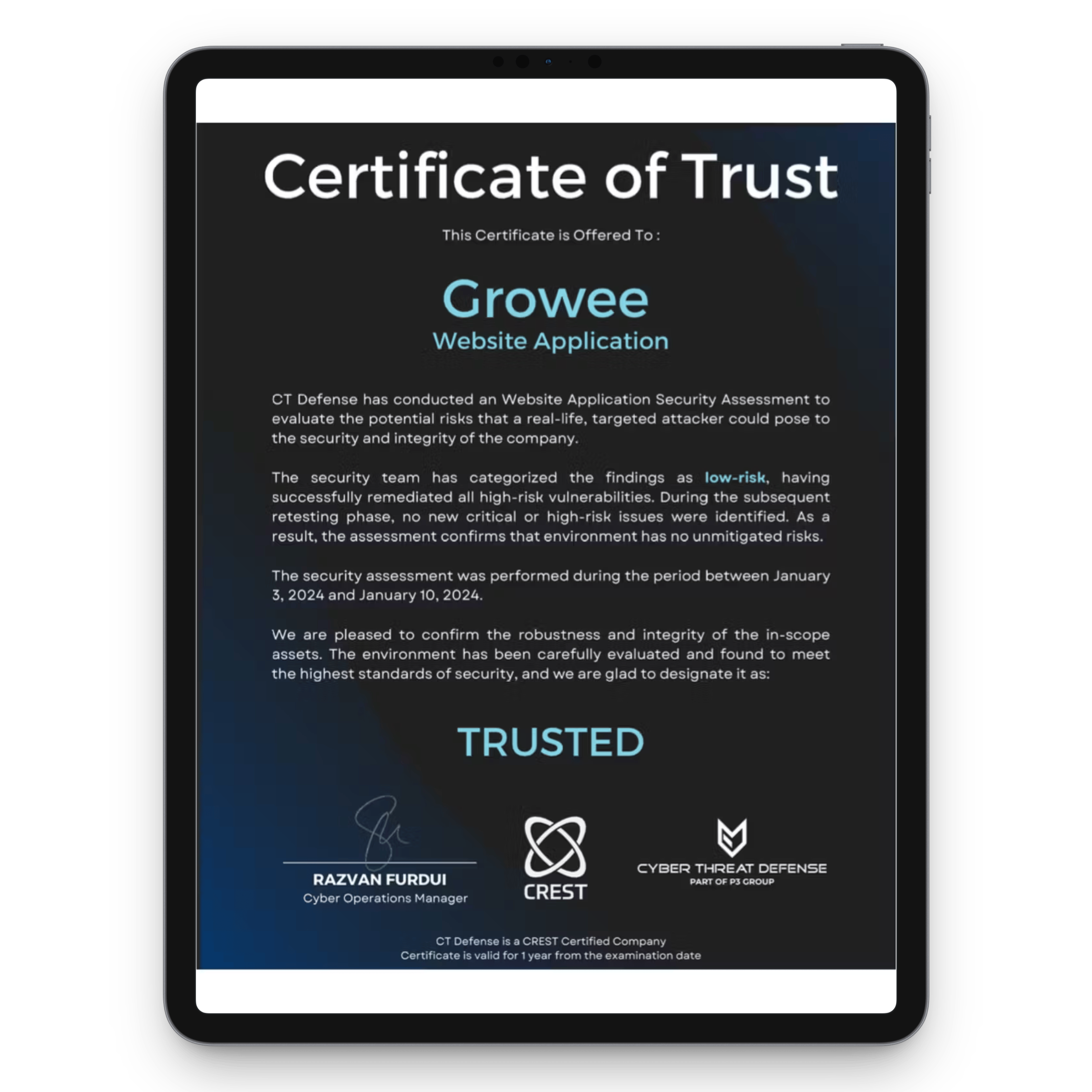
We received the Certificate of Trust from Cyber Threat Defence following a detailed cybersecurity audit. This ensures our application is safe and stable.
- Growee has been independently pen-tested and audited by Cyber Threat Defence, a specialist cybersecurity firm, giving you third-party validation of our security posture.
- All personal data and documents stored on the platform are encrypted, both in transit and at rest.
- We are GDPR compliant and PCI certified, meeting internationally recognized standards for data protection and payment security.
- We conduct regular audits and continuously monitor the platform to keep your data safe as threats evolve.
How we protect your data
Our servers are hosted on Amazon Web Services (AWS), one of the world's most trusted cloud providers. Combined with strict internal controls and regular third-party vetting, your data is protected at every layer.
- All data transmitted between your devices and our servers is encrypted using industry-standard TLS protocols, ensuring it cannot be intercepted in transit.
- Access to personal information is limited to authorized personnel only, using unique login credentials and role-based permissions to prevent unauthorized access.
- We only collect and retain the information necessary to provide our services. We do not store or process more data than is required for the intended purpose.
- Before engaging any third-party providers, such as Stripe and SignRequest, we conduct thorough due diligence to ensure they meet high security standards and comply with data protection regulations.
Are you ready for a new experience?
You can try Growee for free for up to 3 employees, with no obligation or payment.
Frequently asked questions
How do I change my Growee account password?
In the 'Security' section of your profile, if your account was created using social networks like Gmail, the password cannot be changed here but through Gmail. If you used another email address and set the password in Growee, you can change it here.
How do I know this application is safe?
At the beginning of the year, we received the Certificate of Trust from Cyber Threat Defence following a detailed cybersecurity audit. This ensures our application is safe and stable.
Can employees see the company's projects and invoices?
Invoices: not by default. Among the built-in roles, Admin holds the invoice permission, and a custom role can be granted it. Projects: an employee sees the projects they are assigned to, Admin and Manager manage all projects, and HR can view all of them.
What happens in the event of a data breach?
In the unlikely event of a security incident, we have established procedures to promptly identify, contain, and mitigate the impact. If required by applicable laws, we will notify you and the relevant authorities about the incident and take appropriate actions to resolve it.
Do you anonymize user data?
Where possible, we anonymize or pseudonymize data used for statistical analysis and reporting, ensuring no individual can be identified from aggregated data.
How does your team handle data internally?
Our team undergoes regular training on data security and privacy best practices, with a strong emphasis on handling data responsibly and maintaining the highest level of confidentiality.