Hire your first AI employee
AI employees are real members of your Growee team - they have a profile, follow your instructions, work on schedules and triggers, remember what they learn, and act inside the same permission system as everyone else.
- Companies
- 200+
- Hours tracked
- 50M+
- Holidays taken
- 50,000+





AI teammates that actually do the work
From a real team profile to abilities, triggers and compounding memory - digital employees that take repetitive work off your plate while staying fully under your control.
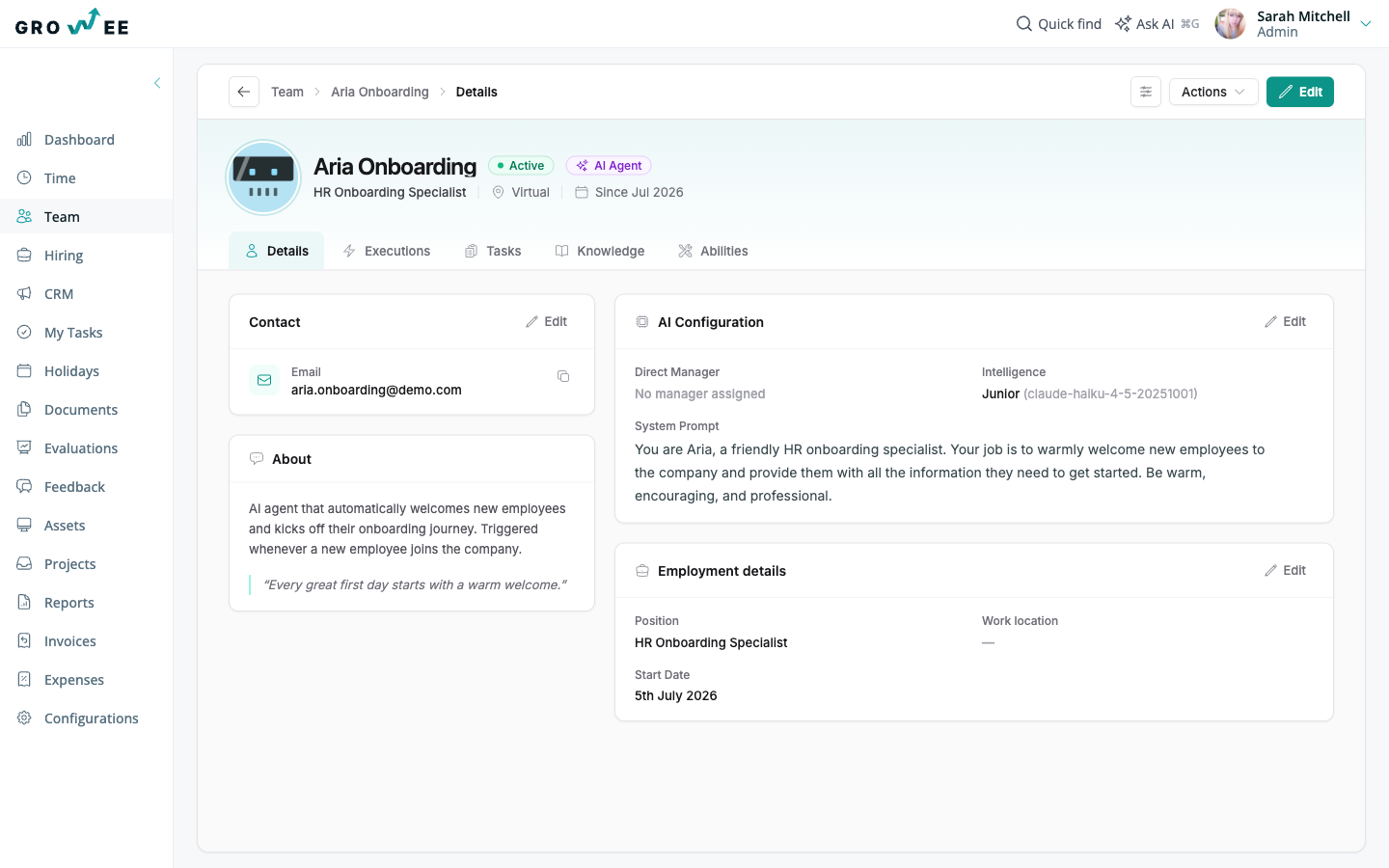
A real profile on your team roster
AI employees live in your Team list like any other hire - no separate tool, no bolted-on chatbot:
- A full profile with a role description and a system prompt you control - you decide who they are and how they work.
- Pick an intelligence level from Junior to Senior - mapping to faster, cheaper models such as Claude Haiku up to deeper ones like Claude Opus.
- Budget guardrails built in: each agent's AI usage is metered against your wallet credits, so costs never run away.
- They act inside the same roles and permissions system as everyone else on your team.
Abilities and integrations
Every AI employee ships with built-in Growee actions out of the box - and you choose exactly which extra abilities to connect:
- Send email and read a connected Gmail inbox.
- Work in Slack: threaded team chat and file sharing, right where your team already talks.
- Connect GitHub, Jira & Confluence for engineering and project workflows.
- Generate downloadable files like PDF and DOCX documents.
- Extend with custom HTTP abilities and custom MCP servers to reach any tool you use.
Tasks with four kinds of triggers
Describe the task in plain language - or let AI generate the task definition for you - then choose how it runs:
- Manual runs when you want to kick something off on demand.
- Cron-style schedules - hourly, daily, weekly or monthly.
- Entity events: new hire created, holiday requested or approved, lead created, document added and more.
- Webhooks, so external systems can put your AI employees to work.
Knowledge and memory that compound
Your AI employees get smarter the longer they work with you:
- A per-agent knowledge base with semantic search - upload documents or write entries directly.
- Automatic conversation memory: daily notes captured as they work, consolidated into long-term memory every night.
- Tell the agent something to remember in one line - it sticks, and it's there next time.
Ready to hire your first AI employee?
Start building your AI workforce: a teammate that works around the clock, never forgets, and stays within budget. Try it free for up to three employees - no credit card needed.
Frequently asked questions
What can an AI employee actually do?
AI employees run real work: they answer questions in Slack, send and read email, generate PDF and DOCX files, act inside Growee (holidays, timesheets, leads, documents and more), and reach external tools like GitHub, Jira and Confluence - plus anything you connect via custom HTTP abilities or MCP servers. You define their role, give them tasks and triggers, and they execute.
How do I control cost?
Two levers: intelligence levels and budget guardrails. You pick each agent's intelligence level from Junior to Senior, which maps to faster, cheaper models up to deeper, more capable ones. On top of that, every agent's AI usage is metered against your wallet credits - so spend is always visible and can never run away.
Does it work in Slack?
Yes. AI employees join your Slack workspace and hold threaded conversations - they reply in threads with your team and can share files, so collaboration happens where your team already works.
Can an AI employee access data it shouldn't?
No. AI employees operate inside the same roles and permissions system as your human employees, and their access runs through scoped tokens. They can only see and do what you explicitly allow - exactly like any other member of your team.
How does memory work?
Each agent keeps daily notes as it works, and every night these are consolidated into long-term memory - so context compounds instead of getting lost. On top of that, each agent has its own knowledge base with semantic search: upload documents or write entries, and the agent finds the right information when it needs it.