The Leave Management System for Growing Teams
Growee is a leave management system: employees request time off in the platform, the right manager approves in one click, and balances, the presence sheet, and the team calendar update on their own. Policies are configurable per leave type and contract type, and every record exports to CSV. Free for up to 3 people.
- Companies
- 200+
- Hours tracked
- 50M+
- Holidays taken
- 50,000+





Leave Management Made Effortless
Configure leave policies, route approvals to the right manager, and keep a complete leave history in one place. National holidays and attendance data are part of the same system, so nothing has to be copied into a spreadsheet.
Fast & Transparent Leave Approvals
Approving time off is quick and clear with Growee:
- Employees submit leave requests directly in the platform.
- Each request can name an approver, and the form suggests the employee's direct manager when one is set in their profile. That approver gets an email about the new request. With hierarchical approvals, anyone whose role includes the Manage holidays for subordinates permission can approve requests from the people who report to them, directly or further down the chain, and the Manager, HR, and Admin roles can approve any request.
- Approvals or rejections take just one click.
- For paid leave types with a yearly allowance, the approval itself deducts the days from the employee's balance. Growee then adds the leave to the employee's timeline and, if your company has connected a Google Calendar for leave, to that calendar.
Hierarchical Approvals
Empower your leadership structure with granular approval control:
- People with the Manage holidays for subordinates permission can approve leave for everyone who reports to them.
- With the right permission, each team lead handles their own team's time off.
- Maintain clear accountability and faster approval cycles.
Leave Balances & History Tracking
The system manages leave accumulation, carry-overs, and adjustments, even when time off spans across calendar years. Accrued days are added by a daily calculation, and approvals and manual adjustments change the balance when they are saved. Employees and HR see current balances and the full history behind them.
- Set initial balances, earning rules, or bonuses with just a few clicks.
- Grant compensatory days or make custom adjustments whenever needed.
Centralized Holiday Balance Management
Get complete oversight of your team's time off in one comprehensive view:
- See all employee holiday balances organized by years and holiday types.
- Filter by specific employees, teams, or departments for targeted insights.
- Make quick adjustments with Excel-style inline editing directly in the table.
Visual Holiday Planner
Plan and visualize team absences effortlessly with an intuitive calendar interface:
- View upcoming leave across 4, 6, or 12-month periods at a glance.
- See national holidays, weekends, and personal holidays all in one place.
- Automatically calculate start dates, end dates, and total holiday days for selected intervals.
Team Capacity Reports
Manage team availability proactively with comprehensive capacity planning:
- View team capacity for any selected period, factoring in approved holidays.
- See weekly allocation, national holidays, days off, and working days for each team member.
- Calculate total available hours across your entire team.
Fully Configurable Leave Policies
Configure time off the way your company actually runs it:
- Create policies for paid, sick, parental, unpaid leave or any custom leave type.
- Choose between Given (upfront allocation) or Accrual policies (accumulation per working day) to match how leave is legally earned in your region.
- Set earning rules, carry-over limits, and expiration dates.
- Adjust your company's national holiday calendar - add, remove, or edit days to match how your organization observes them.
Export Leave Data Anytime
Need a quick overview of your team's absences?
- Export detailed leave data in CSV format anytime - by period, employee, leave type, team, or department.
- Generate accurate reports for payroll, compliance, or audits in seconds.
Customizable Leave Cancellation Rules
You have full control over how leave cancellations are managed:
- Set clear rules for when and how employees can cancel time off.
- Allow or restrict cancellations before a chosen start date.
- Keep HR workflows smooth while giving employees flexibility when plans change.
Smart Presence & Attendance Sheets
The system syncs approved leave with attendance sheets automatically, so managers and HR always have a clear picture of who's present and who's on leave.
- Attendance records update automatically with every approved leave.
- No more chasing signatures, emails, or manual corrections.
Leave Policies Tailored to Contract Types
Leave entitlements and policies can be customized for each leave type and limited to the contract types they apply to.
- Manage time off for people on employment contracts, internships, and B2B contracts, with each leave policy applied to the contract types you choose.
- Keep every policy aligned with individual agreements and company standards.
Auto-Generated Holiday Documents
Streamline documentation with automated template-based generation:
- Define custom document templates for different leave types.
- Generate required documents automatically upon holiday approval.
- Ensure compliance and consistency across all leave documentation.
Digital leave tracking with a full leave history
Going digital is not just moving the request form off paper. The value is the record it leaves behind: every request, approval, cancellation, carry-over and adjustment stays attached to the employee, so "how many days do I have left?" is answered by the system instead of by someone's memory of a spreadsheet.
- Balances update the moment a request is approved - no end-of-month reconciliation.
- Accumulation and carry-overs are handled automatically, including leave that spans two calendar years.
- Compensatory days, bonuses and custom adjustments are applied in a few clicks and show up in the balance immediately.
- Approved leave flows straight into the attendance sheet and the capacity report.
- Employees read their own history; HR filters and exports it to CSV for payroll, compliance or an audit.
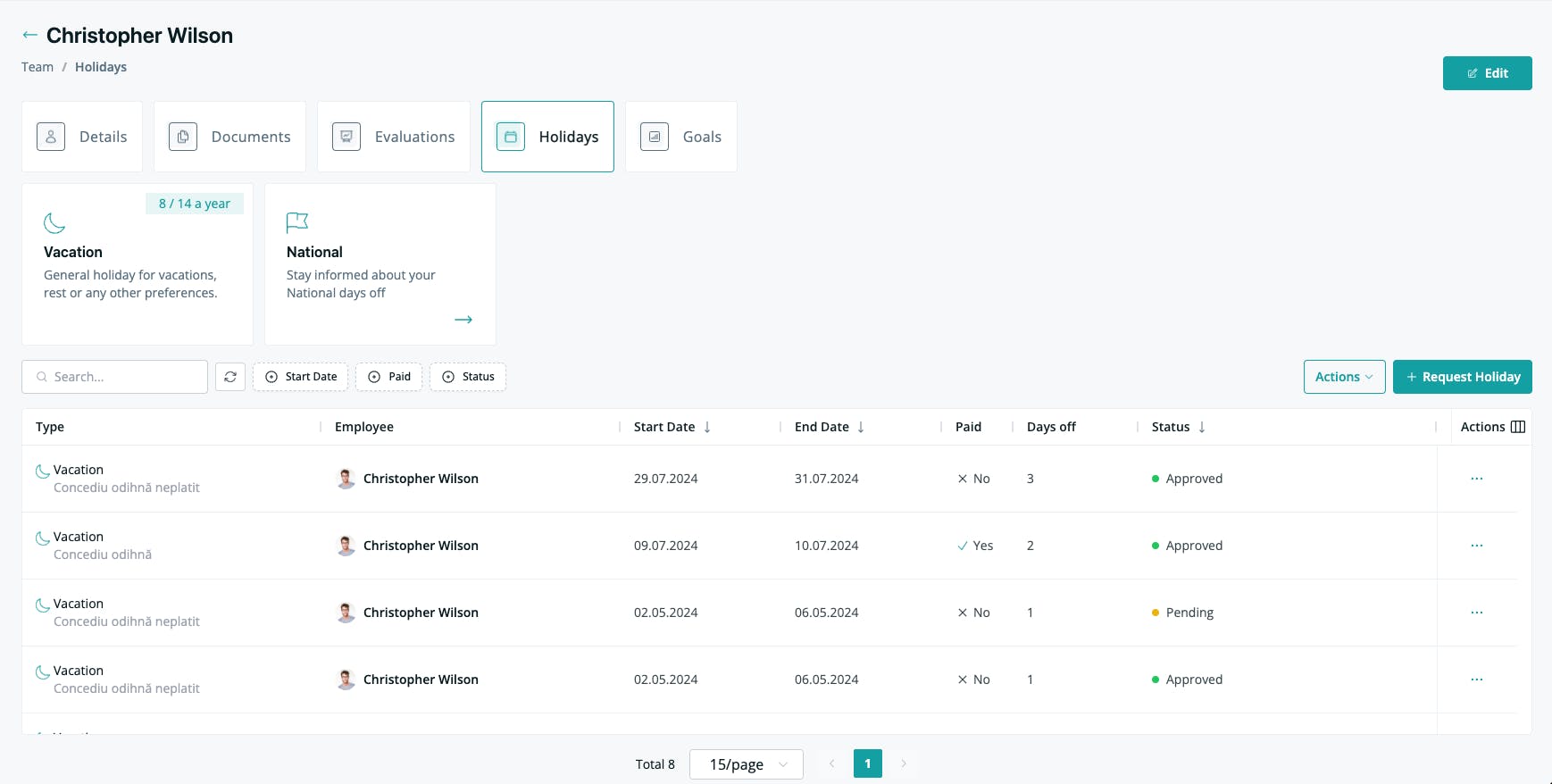
Leave management software for small teams
Small teams rarely have a dedicated HR person, and they should not have to buy a dedicated HR suite to know who is off next Tuesday. Growee is free for up to 3 people and €2 per person per month after that, with leave included rather than sold as an add-on.
Free for your first 3 people
Leave management is included from the first plan - €0 for up to 3 people, then €2 per person per month. No separate HR tier for approvals or balances.
One record per person
Time off sits on the same employee record as their profile, documents, contract type, and logged hours. Nobody reconciles a leave app against a spreadsheet at month end.
Approvals follow your structure
Direct managers with the right permission approve for their own team through hierarchical approvals, so a five-person company and a fifty-person company both work without an HR coordinator in the middle.
Your data leaves when you want
Any slice of leave history exports to CSV - by employee, team, department, leave type, or period - for payroll, compliance, or an accountant who wants a spreadsheet.
Growee pricing reflects our live plans; it is also available annually at €20/person/year.
Growee vs Timetastic
Timetastic is a good dedicated time-off tool. The honest difference is not who tracks leave better - it is what sits around the leave.
Timetastic describes itself as "staff leave planning software loved by thousands of small businesses across the UK", and it does that job properly: requests from the web or its mobile app, one-click approvals that show who else is already off that week, an interactive wallchart, allowances that update with every booking, a Burnout Board that surfaces who has not taken time off in a while, public holidays for over 3,000 regions, and a Slack integration that can move the whole approval flow out of email (as of August 2026). If leave is the only thing you need to track, that is a fair choice and we would not argue with it.
The difference is scope. Timetastic's two leave plans - Business and Pro - are grouped on its own pricing page under "Leave & Absence". Timesheets, clock-in/out and storing "all of your HR data in one place" belong to a separate product, Rota & Time Clock, which its pricing page labels a new product with an early-access sign-up rather than a self-serve purchase (as of August 2026). Growee starts from the employee record instead: leave, timesheets, documents, evaluations and invoicing are the same system, which is why an approved day off already shows up on the attendance sheet and in the capacity report without anyone copying it across.
Timetastic figures and quotes as of August 2026, from timetastic.co.uk/pricing, timetastic.co.uk/how-it-works and timetastic.co.uk/leave-management-system. £1.20 (Business) and £2.00 (Pro) per user per month are taken from the vendor's own structured pricing data for GB; the same page renders other currency figures elsewhere, so check timetastic.co.uk for pricing in your region. "Separate early-access product" means those capabilities are listed under Timetastic's Rota & Time Clock plan, which its pricing page presents as a new product with an early-access sign-up, not under the Business or Pro leave plans. Invoicing is marked absent because it does not appear anywhere in the feature set published on timetastic.co.uk - Timetastic does not state that it is missing. Growee figures reflect our live plans.
Ready to Simplify Leave Management?
Save time and reduce errors with automated leave management. Try it free for up to 3 employees - no credit card needed.
Frequently asked questions
What is a leave management system?
A leave management system replaces spreadsheets and email threads for time off: employees request leave, managers approve against live balances, and the calendar, presence sheet, and leave history update automatically. In Growee, leave lives on the same employee record as timesheets and documents, and it is free for up to 3 people.
Who can approve leave requests?
Users with the HR, Manager, or Admin role can approve or reject any leave request. Through hierarchical approvals, anyone whose role includes the Manage holidays for subordinates permission can also approve requests from the people who report to them, directly or further down the chain. When a leave request is created, the employee can name an approver (the form suggests their direct manager when one is set), and that approver receives an email. The email only goes out when an approver is named.
Can I export approved leaves?
Yes, leaves can be viewed, filtered, and exported in CSV format for a specific period, employee, leave type, team, or department at any time.
Can I export a list of leave days for all employees?
Yes, you can generate and export a complete list of all employee leave days at any time in CSV format for payroll, compliance, or audit purposes.
How can I customize holiday policies for different contract types?
You can limit each holiday policy to the contract types it applies to, such as employment contracts, internships, or B2B contracts. Give each policy its own yearly allowance, carry-over, and waiting period, so each group follows the rules that fit it.
Does Growee automatically update leave dates on the presence sheet?
Yes, Growee's synced attendance sheet updates automatically with every approved leave, eliminating the need for manual entries or signatures. Managers and HR always have an accurate, real-time view of team availability.
Can I customize the national holiday calendar?
Yes. You can add, remove, or adjust days on your company's national holiday calendar, and leave balances and approvals recalculate automatically. The calendar is set at company level and applies across your organization.
How does the Visual Holiday Planner help with team scheduling?
The Visual Holiday Planner displays upcoming leave across 4, 6, or 12-month periods in an intuitive calendar view. You can see national holidays, weekends, and personal holidays all in one place, helping you prevent scheduling conflicts and maintain optimal team coverage.
What are capacity reports and how do they work?
Capacity reports help you manage team availability by showing team capacity for any selected period, factoring in approved holidays, weekly allocation, national holidays, and working days. You can see total available hours across your entire team, making it easy to plan projects and avoid under-staffing.
Can HR automate leave approval workflows, track balances, and give employees self-service access to their leave history?
Yes, and those three things are one flow in Growee rather than three tools. Employees submit their own requests and see their own balance and leave history without asking HR. Each request can name an approver, who gets an email, and through hierarchical approvals a team lead with the right permission decides for their own team in one click.
On approval, the balance, the attendance sheet, and the shared calendar update on their own, and any required leave document can be generated from a template. HR can then filter the resulting history by employee, team, department, leave type, or period and export it to CSV for payroll or an audit.
Can employees see their own leave history and balance?
Yes. Every employee can see their current balance and the full history behind it - requests, approvals, carry-overs, and adjustments - so time-off questions do not have to go through HR at all. Managers see the same records for the people they approve for.
HR and admins get the centralized view: all balances organized by year and leave type, filterable by employee, team, or department, editable inline, and exportable to CSV whenever a record is needed outside the platform.