Know who has every laptop
Track every laptop, monitor, phone, and license your team uses (who holds it, what it cost, and its status) right inside the HR platform you already run. No separate asset tool, no new login.
- Companies
- 200+
- Hours tracked
- 50M+
- Holidays taken
- 50,000+





Every asset your company owns, in one place
Managing company hardware shouldn't mean chasing a spreadsheet nobody keeps current. Growee tracks what you own, who holds it, and what it's worth, inside the same login that runs your HR.
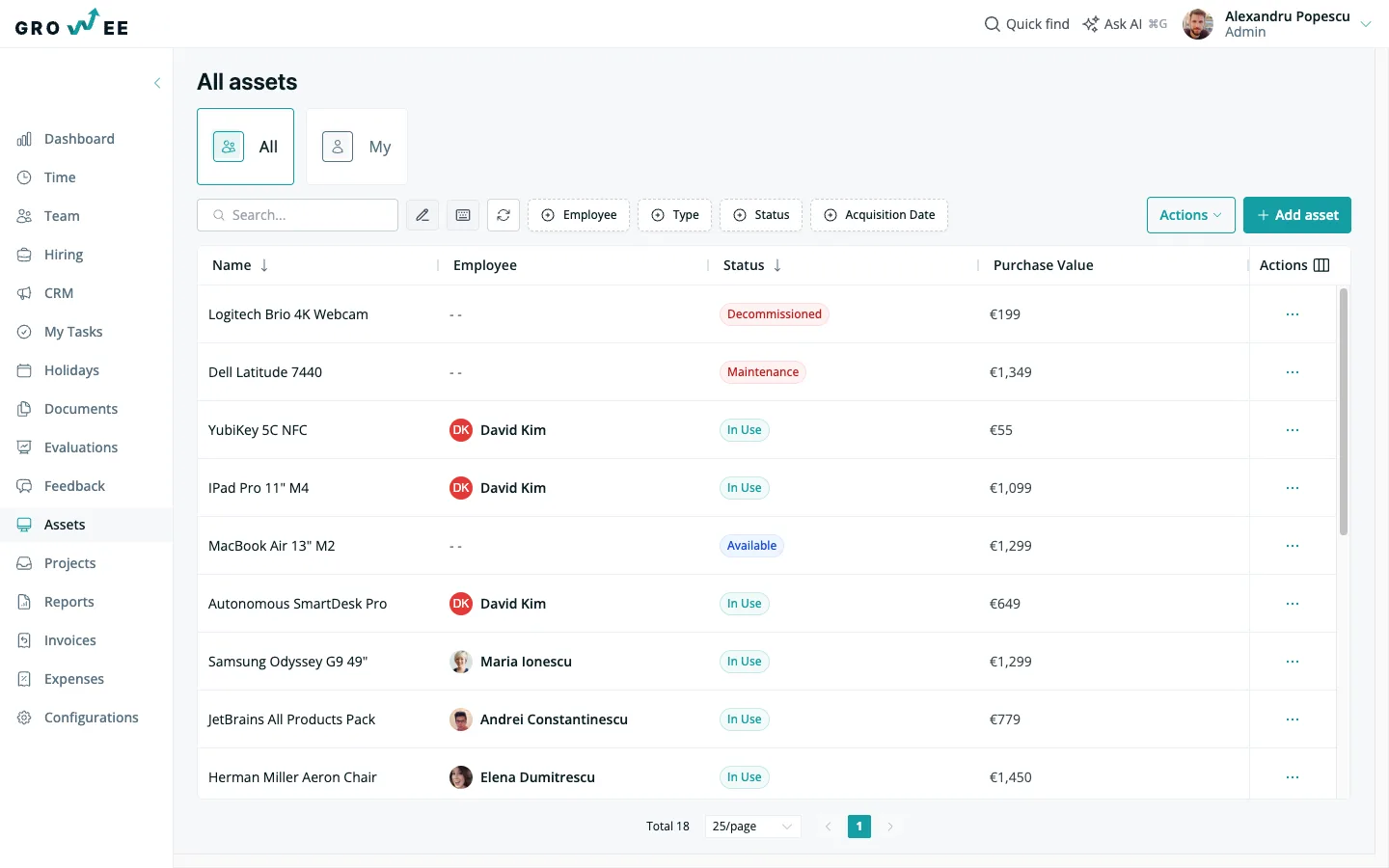
Know who has every laptop, right now
One inventory for everything the company owns, and one column that answers the question you actually ask: who has it?
- Assignee on every row: each asset shows the employee holding it, its status, and its value, so who-has-what is never a guess.
- Available vs. in use at a glance: spot free laptops, assigned monitors, and unassigned gear without opening a single record.
- Search by serial or model: full-text search across name, model, serial number, and supplier finds any device in seconds.
- One screen for the whole fleet: laptops, monitors, phones, desks, and licenses live in the same list, not five spreadsheets.
The full story behind any device
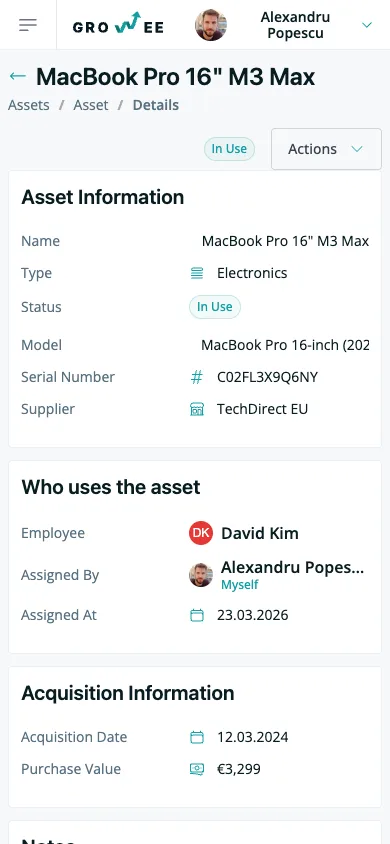
Open an asset and see everything about it: who uses it, who handed it over, and what it cost.
- Who uses it, and since when: the detail page names the assigned employee, who assigned it, and the assignment date.
- Acquisition on the record: purchase value, currency, and acquisition date sit next to the specs, not in a finance file.
- Model, serial, supplier: the identifying details you need for a warranty claim or an audit, all on one card.
- Notes for the context: keep condition notes, accessories, or handover details right on the asset.
Hand over gear with one field
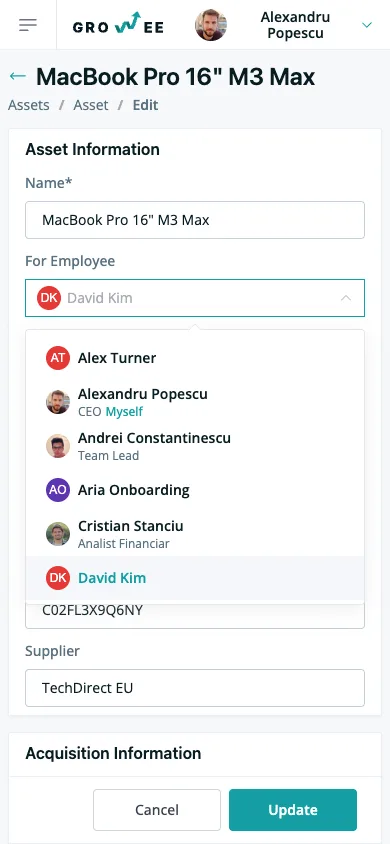
Assigning an asset is one field, not a checkout ticket.
- Pick the employee: choose anyone on your team from the assigned-to field and the asset is theirs.
- Status flips automatically: assign an available asset and its status moves to In Use (no second step to remember).
- Reassign anytime: gear moves between people as your team changes, and the record follows it.
- They see it in their own view: as soon as you save, the item appears in the assigned employee's own assets view.
Every person's kit on their profile
Open an employee and see exactly what they're holding, the view that turns offboarding from a scavenger hunt into a checklist.
- A full gear list per person: the employee profile has an assets tab showing every item assigned to them.
- Recover before the last day: know the laptop, monitor, and phone to collect before someone leaves.
- Decommission unassigns automatically: mark an item decommissioned and it clears off the employee's record without extra clicks.
- Personal view for everyone else: by default, an employee sees the items assigned to them, no admin access needed.
Log an asset with the details that matter
A short form captures everything you'll want later, from serial numbers to purchase value.
- Name, type, model, serial: classify each item as electronics, furniture, software, a subscription, and more.
- Supplier and purchase value: record what you paid, in the currency you paid it, with the acquisition date.
- Assign as you create: hand a new laptop to its owner in the same form, and its status starts as In Use.
- Attach the paperwork: keep the warranty, receipt, or license file on the asset from day one.
A status for every stage of an asset's life
Assets move through Available, In Use, Maintenance, Decommissioned, and Lost. And filters let you find any of them in a click.
- Five clear statuses: color-coded chips show at a glance what's free, in use, in for repair, retired, or missing.
- Mark maintenance, decommissioned, or lost: change an asset's state in one click when it goes in for service or leaves the fleet.
- Filter by anything: narrow by employee, type, status, or acquisition date to answer a question without scrolling.
- Spot the gaps: filter to unassigned or lost items before they turn into a budget surprise.
Edit inline, export in a click
Update your inventory the way you'd update a spreadsheet, then hand finance a clean file whenever they ask.
- Spreadsheet-style editing: change a name, model, serial, value, or status right in the table, and the change saves as soon as you finish editing the cell.
- No forms to open: fix a typo or bump a value without leaving the list view.
- Export to Excel: pull the full inventory (assignee, type, status, serial, supplier, value, acquisition date) into a formatted file.
- Always current: because assignments and statuses live here, the export reflects reality, not last quarter.
Warranties and receipts on the record
The paperwork that usually lives in someone's inbox stays attached to the asset itself.
- Attach any document: warranties, receipts, and license files clip straight onto the asset.
- Everything on one record: proof of purchase sits next to the value, serial, and current holder (ready for an audit or a claim).
Your inventory has a second brain
Growee's AI reads your asset inventory directly: every item, its assignee, its status, and its value. Ask which laptops are unassigned before a new hire starts, or how much you've spent on hardware this year, and get an answer without building a report.
Because every asset is queryable straight from your AI assistant through MCP (the open standard that connects AI assistants directly to your data), the assistant can also create an asset, update a serial number, or mark an item for maintenance on your say-so. Pair it with Ask AI and it's less a tool bolted onto your inventory, and more a second brain that already knows who has what.
Everything you'd bolt on with a dedicated asset tool, already in your HR platform
Asset spreadsheet
Replaces the shared inventory sheet nobody keeps current.
Equipment checkout tool
Assign and return gear without a separate checkout app.
Serial & warranty binder
Serial numbers, suppliers, and receipts attached to each item.
Fixed-asset register
Purchase value, currency, and acquisition date on every item.
Laptop tracking tool
Know which laptop each person holds, in real time.
Offboarding checklist
See a leaver's full kit and recover it before the last day.
A second login
One account your team already opens for time off and payroll.
The same inventory, on your phone
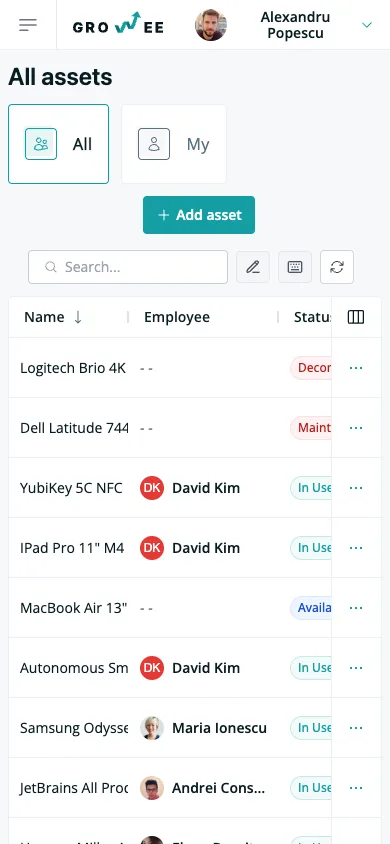
Check who has what, open an asset, or assign gear from wherever you are (no separate app to install).
Frequently asked questions
Can I see who has which laptop right now?
Yes. Every asset row shows the employee holding it, and each employee profile has an assets tab listing their full kit. Assign a laptop and it moves to In Use automatically, so who-has-what stays accurate without anyone updating a spreadsheet.
How does equipment checkout and return work?
Assigning an asset to an employee is a single field. Pick the person and the status flips to In Use. Reassign it anytime as gear moves between people, or mark it decommissioned to retire it, which clears it off the employee's record automatically.
What happens to an asset when an employee leaves?
Open the leaver's profile to see every item assigned to them, so you know exactly what to collect before their last day. Reassign each piece to its next owner, or mark it decommissioned or lost. Decommissioning unassigns the employee for you.
Can I track purchase value and warranties?
Each asset stores its purchase value, currency, supplier, and acquisition date next to the model and serial number. You can also attach the warranty, receipt, or license file directly to the asset, so the proof of purchase is always one click from the record.
Who can see and manage assets?
It depends on the manage-assets permission, which the Admin, Manager, HR, and IT Manager roles hold by default. Those roles see and edit the whole inventory and run the actions, and a custom role can be granted the same permission. Exporting the list also needs the manage-employees permission, which Admin, Manager, and HR hold by default. By default, an employee sees the items assigned to them in their personal view (no extra setup required).
Know who has every laptop, starting today
Set up your inventory in minutes (no new login, no new tool to learn).