Send it, sign it, filed
Send an offer, a client agreement, or an employment contract for signature straight from the record it belongs to. The signer signs in their browser. The signed PDF comes back to that same record, with who signed and when already written down.
- Companies
- 200+
- Hours tracked
- 50M+
- Holidays taken
- 50,000+





How signing works
Three steps, and none of them involve a printer.
- 01
Send it from the record
Open the offer, agreement, or document and choose who signs. Growee renders the offer PDF from your template (or reuses the agreement file it already stored) and sends it to the signer by email.
- 02
They sign in the browser
The signer opens the link and signs on the spot. No Growee account to create, no software to install, no verification code to chase.
- 03
The signed PDF files itself
When signing completes, Growee pulls the certified PDF back from the provider and stores it on the client record as a signed document. The status flips to Signed and the timeline shows the whole run.
Growee checks the signature on every callback from the provider before it changes a status, so an offer only moves when the update is genuine.
Signing that stays attached to the work
Documents are generated where the data already lives, signed without leaving the browser, and filed back on the record the moment they are done.
Build the document once, reuse it forever
Signing starts before anyone signs, with a template that fills itself in.
- Variables, not find-and-replace: drop in employee name, salary, company details, or identification numbers and let the document assemble itself.
- Auto-generate on the event: mark an employee template to auto-generate, and the document is created the moment a new employee is added. The paperwork exists before anyone asks for it.
- Scoped to contract types: point a template at the contract types it belongs to, and it only shows up where it applies.
- Offers render the same way: a sales offer becomes a PDF from your own layout, then goes straight out for signature.
See what is signed, and what each signature recorded
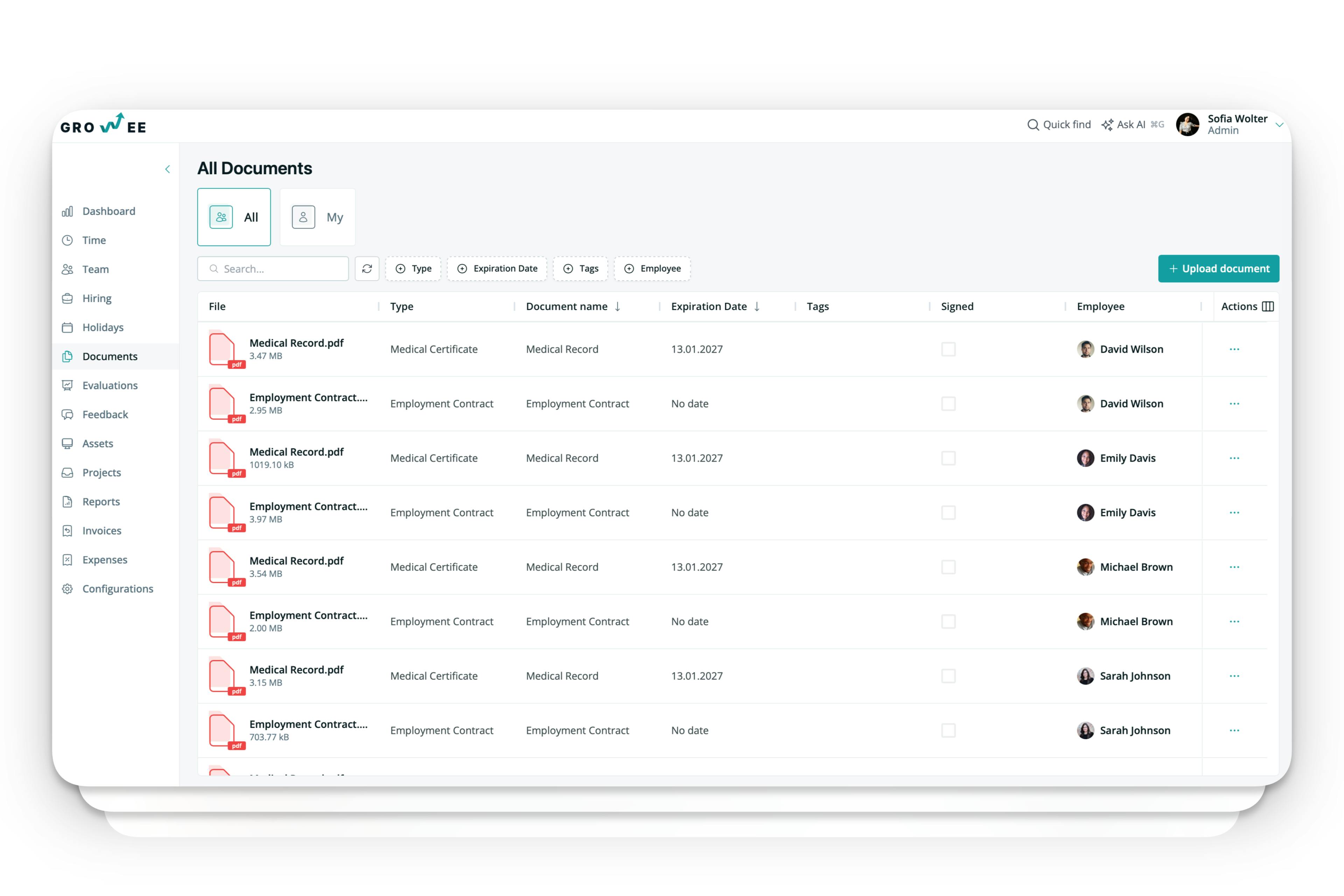
Chasing signatures usually means digging through email. Here it is a column.
- A Signed column on the list: scan the document list and see which files still need someone's name on them.
- Filter to the gap: narrow by type, employee, tag, or expiration date to find the batch you actually need to close out.
- Expiry lives here too: contracts and certificates carry expiration dates in the same list, so renewals do not become a second system.
- Context on every signature: for documents signed inside Growee, the record keeps the signer's name and email, the timestamp, the IP address and browser it came from, and where on the page it was placed.
- A fingerprint tied to the file: Growee computes a hash from the document's own contents plus that signing context, and can re-check it later to tell whether either one changed since.
Every step lands on the record
Nobody has to log what happened. The record writes its own history as the signature moves.
- Sent, viewed, signed, declined: each one adds an entry to the client's timeline, in the order it happened.
- Its own timestamp per step: the offer carries the moment it was sent, opened, and closed out, not just its current state.
- Filed as a signed document: the returned PDF is stored on the record and marked as coming from a signature, so it reads differently from a manual upload.
- Nothing to forward: the client record is the log, so the person picking this up next week does not need your inbox.
Offers move through statuses you can trust
An offer out for signature is not a black box. It reports back on its own.
- Draft → Sent → Viewed → Signed: with Declined and Expired as the other endings. You always know which of those you are in.
- Viewed means viewed: the moment the signer opens the link, the offer moves and the time is stamped (no "did they get it?" follow-up email).
- Every update is verified first: Growee checks the cryptographic signature on each provider callback before it changes anything, and ignores updates that do not fit the flow.
- Once signed, it stays signed: Signed, Declined, and Expired are final. Nothing silently rewrites a closed offer.
Where signing plugs in
The same signing flow, wherever paperwork shows up: sales, client work, and HR.
Sales offers
Build the offer, send it for signature, and the certified PDF lands back on the client record.
Client agreements
Send the agreement you already generated. Growee reuses that exact file instead of re-rendering it.
Employment contracts
Generate from a template, sign in Growee, and keep the signed copy on the employee's file.
Holiday paperwork
A leave-document template can pull in the requester's and the approver's saved signatures, so the generated document comes out with both already on it.
A signature you save once
Draw it once and reuse it, or sign fresh each time. Saved signatures belong to the person who drew them.
Signers outside your company
Share a document by link and someone with no Growee login can still sign it.
One login, not two
Signing lives inside the documents and pipeline you already keep in Growee, not in a separate e-signature tool with its own account.
Frequently asked questions
Can a small business manage employee onboarding, digital document signing, and HR records without a dedicated HR department?
Yes. That is the case Growee is built for. Set up a contract template once with employee variables, and mark it to auto-generate when a new employee is created, so the paperwork exists the moment someone is hired. The new hire signs it in the browser, and the signed PDF stays on their employee file with its expiration date, next to their other records. Roles do the gatekeeping you would otherwise do by hand: HR, Manager, and Admin see all documents, while an employee only ever sees their own.
There is no HR headcount assumed anywhere in that loop. E-signature is part of the paid Growth plan, at €2 per employee per month; the free plan for up to 3 employees covers records, document templates and leave. Either way a founder-run team runs it without hiring for it first.
Do signers need a Growee account?
No. Offers and agreements go out by email and the signer signs in their browser: no account, no install, and no verification code to type in. For a document already stored in Growee, you can share it by link and an outside signer can sign that link directly. Growee records their name and email as part of the signature either way.
What does Growee record when someone signs?
When a document is signed inside Growee, the signature record keeps the signer's name and email, the timestamp, the IP address and browser the signature came from, and the page and position it was placed at. Growee also computes a fingerprint from the document's own contents combined with that signing context, and can re-check it later, so if the stored file or the signature record is altered afterwards, the check stops matching.
Offers and agreements sent out through the signature provider come back as the provider's certified PDF, which carries its own audit trail, and Growee records the signer plus the sent, viewed, and signed times on the offer itself. This describes what Growee stores and how it verifies its own records. It is not legal advice about what a signature is worth in your jurisdiction.
What happens right after a document is signed?
Growee downloads the certified PDF from the signature provider and files it on the client record as a signed document, so the final copy sits with the deal it belongs to instead of in someone's inbox. The offer moves to Signed with the time it happened, and an entry lands on the record's timeline. Declines and views are handled the same way: the timeline shows sent, viewed, signed, or declined without anyone logging it manually.
Which e-signature provider does Growee use?
Growee sends offers and agreements through Yousign. The integration is written against an internal driver interface rather than hard-wired to one vendor, so the provider can be swapped without changing how signing works for your team. Every status update Yousign sends back is checked against a shared secret before Growee acts on it, and updates that do not fit the offer's current state are ignored and logged instead of applied.
Can I tell which documents are still waiting for a signature?
Yes. The document list carries a Signed column, so unsigned files are visible without opening anything. Filter by document type, employee, tag, or expiration date to pull up the exact batch you need to close out, the same list that tracks contract expiry, so renewals and signatures do not end up in two different places.
Stop chasing signatures over email
Send your first contract or offer for signature today, from the record it already belongs to.