Company wiki, team docs, and a public help center - in one knowledge base
Write your handbook, runbooks, and policies in a Notion-style editor next to the HR data they describe. Keep leadership notes private, share pages with guests, and publish a branded help center your customers - and their AI assistants - can actually search.
- Content blocks
- 15+
- Publish a help center
- 1 click
- Page visibility levels
- 4
Everything a living knowledge base needs
Most company wikis die because they live in a separate tool nobody opens. Growee puts yours inside the platform your team logs into every day - next to the time off, projects, and people it documents.
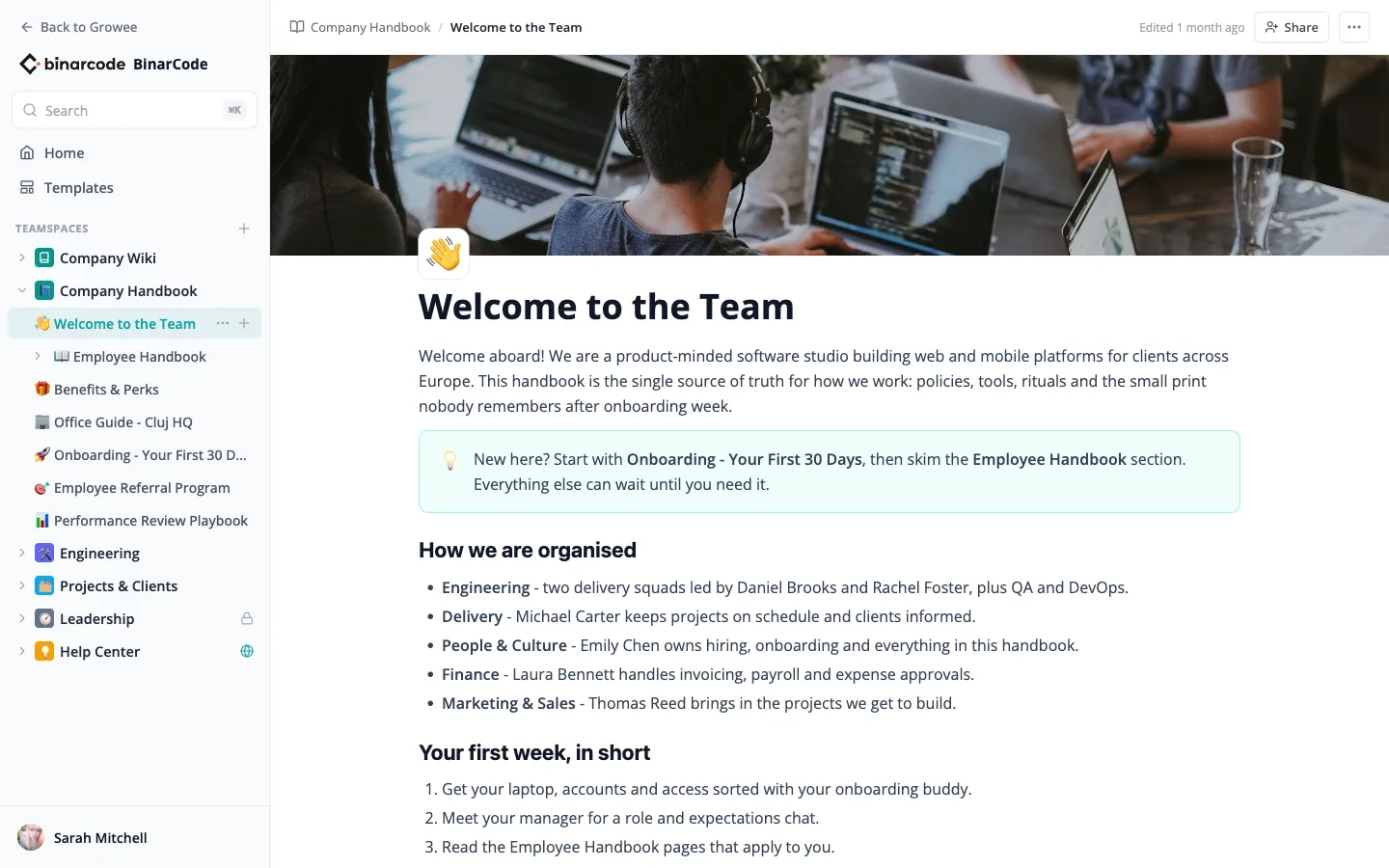
A Notion-Style Editor Your Team Already Knows
Write the way you write anywhere else - no training session required.
- Every block you expect: headings, callouts, tables, toggles, task lists, columns, images, files, and code blocks.
- Slash commands, drag handles, emoji icons, and cover images keep pages fast to build and pleasant to read.
- Autosave with conflict detection, so two editors never silently overwrite each other.
Teamspaces That Mirror How Your Company Works
Organize knowledge by team, not by folder tree archaeology.
- Workspace teamspaces for handbooks, engineering docs, and project wikis everyone can read.
- Private teamspaces for leadership or HR - visible only to invited members with owner, editor, or viewer roles.
- Nested pages with drag-and-drop reordering keep every space tidy as it grows.
Share a Page with Exactly the Right People
Permissions live on every page, not just at the top.
- Restrict sensitive pages to specific people with view or edit rights - salary bands stay with leadership.
- Guest links for outsiders: send a client or candidate a tokenized link, no Growee account needed.
- Sub-pages inherit access automatically, so sharing a chapter shares its children too.
Publish a Branded Help Center in One Click
Flip a teamspace to public and it becomes a customer-facing help center on your own URL.
- Categories, popular articles, and search come built in - with your company name and logo.
- Clean article URLs and sitemaps make every page indexable by search engines.
- Unpublish keeps the slugs, so republishing restores stable links.
Templates So Nobody Starts from a Blank Page
Meeting notes, RFCs, post-mortems, job descriptions - the structure is one click away.
- A template gallery organized by HR, Product, Engineering, and Sales categories.
- Save any page as a template and your team's best documents become everyone's starting point.
- Creating from a template copies the icon, cover, and full structure into the teamspace you choose.
Search That Finds Answers, Not Just Keywords
Press ⌘K anywhere and search the whole knowledge base.
- Full-text search with highlighted matches, grouped by teamspace.
- Semantic AI search understands meaning - "how many days off do I get" finds the vacation policy.
- Keyboard-first: arrow through results and hit Enter, on the internal search and the public help center alike.
Built for the AI Era, Out of the Box
Your help center speaks AI natively, with zero setup.
- Every published article ships a markdown version, llms.txt, and a sitemap, so AI assistants can read your docs accurately.
- Readers can copy any article as markdown or open it straight in Claude or ChatGPT.
- Over MCP, your own AI assistants and Growee AI employees search the same knowledge base your team does.
One knowledge base, five jobs
Company handbook
Policies, onboarding, benefits, and office guides in one place every employee can search - instead of a PDF nobody opens.
Engineering docs
Runbooks, architecture notes, and coding standards with real code blocks - kept next to the people data and projects they reference.
Client-facing help center
Publish support articles, SLAs, and FAQs to a public site your customers can search - and your support team stops answering the same email.
Leadership space
Strategy, OKRs, and compensation notes in a private teamspace - visible to invited members only, restricted page by page when needed.
Project wikis
Kickoff playbooks and per-client project pages, with guest links to share a brief with the client without giving them an account.
AI employee memory
Growee AI employees search the knowledge base before they answer, so the bot in your Slack quotes your actual policy, not a guess.
Four levels of visibility, page by page
From leadership-only to public on the web, every page carries exactly the access you give it - and sub-pages inherit it automatically.
Restricted
Only invited people can open the page, each with view or edit rights. Compensation reviews stay with the people running them.
Workspace
Everyone at your company can read it - the default for handbooks, guides, and team documentation.
Anyone with the link
A tokenized guest link opens one page to someone outside the company - a client, a candidate, an auditor - without an account.
Published to the web
Part of your public help center, with a clean URL, search-engine indexing, and AI-readable markdown built in.
Frequently asked questions
How is this different from Notion or Confluence?
The editor experience is deliberately familiar, but your knowledge base lives inside the platform that already runs your HR, projects, and time tracking - one login, one permission system, one bill. Policies sit next to the leave module they describe, project wikis next to the projects they document, and Growee's AI features can search it all natively.
Who can see what in the knowledge base?
Workspace teamspaces are visible to everyone in your company. Private teamspaces are visible only to invited members with owner, editor, or viewer roles. On top of that, any page can be restricted to specific people, opened to anyone with a link, or published to the web - and sub-pages inherit access from their parents.
Can people outside my company read pages?
Yes, two ways. Share a single page with an external guest through a tokenized link - no account needed, view-only. Or publish a whole teamspace as a public help center with categories, search, and clean URLs that search engines and AI assistants can index.
Does the AI search require any setup?
No. Pages are indexed automatically as they are written, powering full-text search across page titles and content on every plan and, with the paid knowledge-base plan, semantic search that understands questions like "how many vacation days do I get". The same index feeds Ask AI and your AI employees, so answers quote your real documentation.
Is the Knowledge Base included in my plan?
The Knowledge Base is an optional add-on with flat workspace pricing - not per user - so a growing team does not mean a growing docs bill. Check the pricing page for current details, and try it free during your trial.
Give your company's knowledge a home
Start writing in minutes: create a teamspace, pick a template, and publish your first help center article today.