Snap the receipt, skip the spreadsheet
The expense tracking software that does the typing for you: snap a receipt, let AI extract and categorize it, and route it through approval, with multi-currency support and project cost allocation built into the HR platform your team already uses.
- Companies
- 200+
- Hours tracked
- 50M+
- Holidays taken
- 50,000+





Every expense, from snapped receipt to reimbursement
From the moment a receipt is snapped to the moment accounting gets its report, Growee's expense report software keeps every expense structured, approved, and allocated to the right project.
See every expense at a glance
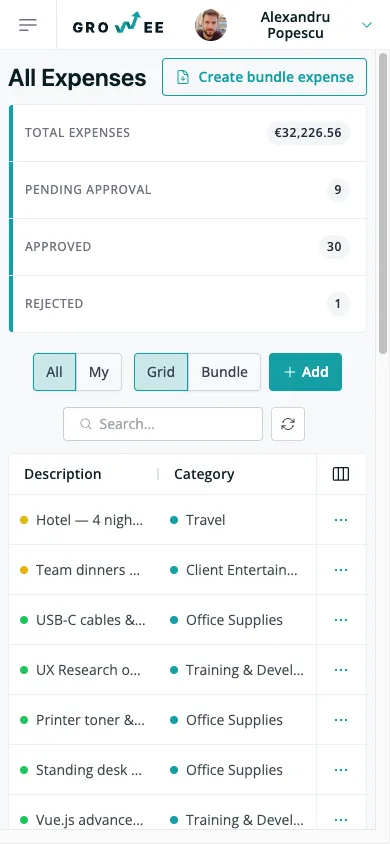
Your spending lives on one screen, organized the way your team actually files it.
- Group or list view: toggle between bundles with their nested expenses and a flat list of everything, on the same data.
- Live stat cards: total value, pending, approved, and rejected counts update the moment a status changes.
- Status badges you can read: draft, pending, approved, rejected, and paid are color-coded so you know where each one stands.
- Filter and sort: narrow by employee, approver, project, category, status, amount, or date range.
Snap the receipt, skip the typing
Upload a receipt and Growee reads it for you: no more copying numbers off a crumpled slip.
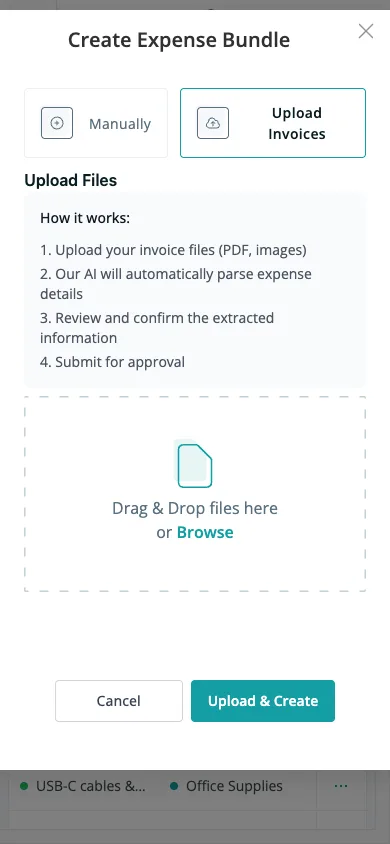
- Photos or PDFs: drag and drop receipts straight from your phone or desktop.
- Vision AI extraction: it pulls the date, amount, currency, description, and category off the document automatically.
- Batch processing: drop up to 20 files at once and Growee works through them in batches.
- Review before you submit: everything the AI reads is editable first, so you stay in control.
Log an expense in seconds
When you'd rather type it in, the form gets out of your way.
- Inline table editing: add rows and edit cells with real-time validation and automatic saving.
- Every field in one row: description, category, date, amount, currency, employee, approver, and project together.
- Attach the receipt inline: upload or view the file right on the row it belongs to.
A clear path from submitted to paid
Every expense follows a transparent route, so it's always clear who decided what.
- Five-state workflow: draft, pending, approved, and paid (or rejected at any point before approval).
- Approve, reject, or mark paid: act on an expense with an optional note explaining the decision.
- Bulk actions: approve, reject, or mark many expenses paid in one move.
- Locked once decided: approved, rejected, and paid expenses can't be quietly edited after the fact.
Bundle a whole trip into one approval
Group the expenses of a conference trip or a delegation and handle them as one.
- One submission per trip: a bundle covers a date range with a title, employee, approver, and project.
- One decision, cascaded: approve the bundle and the status flows to every expense inside it.
- Totals by currency: amounts aggregate per currency and convert to your base currency automatically.
- Build a bundle from files: upload every invoice at once and let AI fill in the bundle for you.
One bundle, every line accounted for
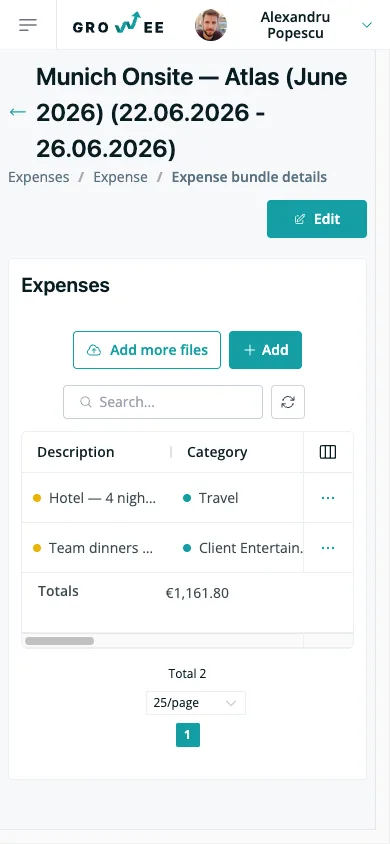
Open any bundle and the whole picture is right there: every line item, totaled and ready.
- Full detail in one place: title, date range, approver, project, and employee, with the expense table below.
- Line items and multi-currency totals: every expense adds up, aggregated per currency at the bottom.
- Add more receipts later: upload additional files to a bundle after it's been created.
Tie spending to the right project
Costs only mean something when they land on the right project, so Growee makes that the default.
- Allocate per expense: assign any expense to a project for cost tracking.
- Accurate profitability: allocated costs flow into project budget reporting, so budget-versus-actual stays honest.
- Optional match check: enforce that the expenses in a bundle match the bundle's project.
Filter down to exactly what you need
Slice the list until you're looking at just the expenses that matter right now.
- Filter by status: narrow to pending, approved, paid, or rejected in a single click.
- Filter by anything else: employee, approver, project, category, amount, or date range.
- 200+ currencies: record in any currency, each with its own exchange rate, and running totals aggregate per currency in the table footer.
Hand accounting a clean package
When it's time to reimburse, you get everything your accountant needs as a Word report or a ZIP archive.
- One-click Word report: a travel-delegation DOCX with itemization, per-diem sections, and signature lines.
- A zipped archive: a CSV summary plus every receipt and attached document, bundled together. Download it right away for the expenses you select, or have Growee email you a link to an expense bundle's archive that stays valid for one week.
- English or Romanian: reports generate in either language, ready to file.
Your receipts read themselves
Growee's AI doesn't sit beside your expenses. It reads the receipt directly. Vision OCR pulls the date, amount, currency, description, and category off a photo or PDF, in batches of up to 20 files, and hands you the result to review. Upload a stack of invoices and it can build the whole bundle for you.
The part that's easy to miss: every expense and bundle is queryable straight from your AI assistant, through MCP, the open standard that connects AI assistants directly to your data. Ask what's still pending approval this month, or how much travel a project has absorbed, and get an answer without opening a report. Pair it with Ask AI and it's less a scanner bolted on, and more a second brain that already knows what you spent.
Everything you'd pay for in a receipt app or Expensify, already in your HR platform
Receipt scanner app
AI reads every receipt, so there's no separate scanner app to install.
Expense report software
Full expense reports and travel forms without a standalone tool.
Reimbursement spreadsheet
Approvals and mark-as-paid tracked in the app, not a shared sheet.
Currency converter
Foreign amounts convert to your base currency automatically.
Accounting export
A ZIP with a CSV summary and every receipt, ready to hand off. Download it right away, or get an emailed link that stays valid for one week.
Per-diem travel form
A travel-delegation DOCX generates itself from the bundle.
A second login
One account your team already opens for time off and payroll.
The same expenses, on your phone
Snap a receipt, check what's pending, or open an expense from wherever you are (no separate app to install).
Frequently asked questions
What receipt formats can I upload?
Receipt photos (such as JPG or PNG) and PDF files. The AI scanner reads both, straight from your phone or desktop (no separate receipt scanner app needed). You can drop up to 20 files at once and Growee processes them in batches.
How accurate is the AI extraction?
The AI reads the date, amount, currency, and description off each receipt and suggests a category. You always review the extracted data before submitting, so anything it misreads is caught before it reaches your approver.
Does Growee handle multiple currencies?
Yes, over 200 currencies. Record an expense in any currency, and each one keeps its own exchange rate so it converts to your company's base currency for reporting. Multi-currency bundles show a running total per currency.
Who can approve expenses?
Each expense has a designated approver. Team members with the expense-management permission can approve, reject, and mark expenses as paid, while everyone else manages their own. Once an expense is approved, rejected, or paid, it's locked from further edits.
How do I hand expenses over to accounting?
Generate a Word report for an expense bundle (a travel-delegation form with itemization, per-diem sections, and signature lines) or get a ZIP archive with a CSV summary and every receipt, either as a direct download for the expenses you select or as an emailed link to a bundle's archive that stays valid for one week. Reports come in English or Romanian.
Ready to ditch the shoebox of receipts?
Let AI do the typing and keep approvals moving (no new login, no new tool to learn).